
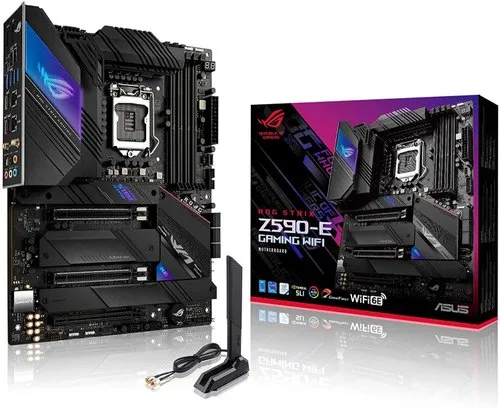
ROG STRIX Z690-E GAMING WIFI
CPU
Supports Intel® Turbo Boost Technology 2.0 and Intel® Turbo Boost Max Technology 3.0**
* Refer to www.asus.com for CPU support list.
** Intel® Turbo Boost Max Technology 3.0 support depends on the CPU types.
Chipset
Memory
4 x DIMM, Max. 128GB, DDR5 6400(OC)/ 6200(OC)/ 6000(OC)/ 5800(OC)/ 5600(OC)/ 5400(OC)/ 5200(OC)/ 5000(OC)/ 4800 Non-ECC, Un-buffered Memory*
Dual Channel Memory Architecture
Supports Intel® Extreme Memory Profile (XMP)
OptiMem II
* Supported memory types, data rate(Speed), and number of DRAM module vary depending on the CPU and memory configuration, for more information refer to www.asus.com for memory support list.
Graphics
1 x DisplayPort**
** Support 8K@60Hz as specified in DisplayPort 1.4.
*** Support 4K@60Hz as specified in HDMI 2.1.
Expansion Slots
Intel® 13th & 12th Gen Processors*
1 x PCIe 5.0 x16 slot**
Intel® Z690 Chipset***
1 x PCIe 4.0 x16 slot (supports x4 mode or x4/x4 mode for ROG HYPER M.2 CARD)
1 x PCIe 3.0 x16 slot (supports x4 mode)
1 x PCIe 3.0 x1 slot
* Please check PCIe bifurcation table in Chapter 1 of user guide.
** When M.2_1 is occupied with SSD device, PCIEX16(G5)_1 will run x8 only.
*** Supports Intel® Optane Memory H Series on PCH-attached PCIe slot.
Storage
Intel® 13th & 12th Gen Processors
M.2_1 slot (Key M), type 2242/2260/2280/22110 (supports PCIe 5.0 x4 mode)
- Intel® 13th & 12th Gen processors support PCIe 5.0 x4 mode.
M.2_2 slot (Key M), type 2242/2260/2280/22110 (supports PCIe 4.0 x4 mode)
- Intel® 13th & 12th Gen processors support PCIe 4.0 x4 mode.
Hyper M.2_1 slot (Key M) via Hyper M.2 card, type 2242/2260/2280/22110***
- Intel® 13th & 12th Gen processors support PCIe 4.0 x4 mode
Intel® Z690 Chipset**
M.2_3 slot (Key M), type 2242/2260/2280 (supports PCIe 4.0 x4 mode & SATA modes)
Hyper M.2_1 slot (Key M) via Hyper M.2 card, type 2242/2260/2280/22110 (suppports PCIe 4.0 x4 mode)****
Hyper M.2_2 slot (Key M) via Hyper M.2 card, type 2242/2260/2280/22110 (suppports PCIe 4.0 x4 mode)****
6 x SATA 6Gb/s ports*****
* Intel® Rapid Storage Technology supports NVMe RAID 0/1/5, SATA RAID 0/1/5/10.
** Intel® Rapid Storage Technology supports Intel® Optane Memory H Series on PCH attached M.2 slots.
*** When ROG Hyper M.2 card is installed on PCIEX16(G5), only Hyper M.2_1 slot can support PCIe 4.0 x4 mode. When ROG Hyper M.2 card is installed on PCIEX16(G3), only Hyper M.2_1 slot can support PCIe 3.0 x4 mode. When ROG Hyper M.2 card is installed on PCIEX16(G4), Hyper M.2_1 and Hyper M.2_2 slots can support PCIe 4.0 x4 mode.
**** When ROG Hyper M.2 card is installed on PCIEX16(G5) or PCIEX16(G3), Hyper M.2_2 slot will be disabled. When ROG Hyper M.2 card is installed on PCIEX16(G4), Hyper M.2_1 and Hyper M.2_2 slots can support PCIe 4.0 x4 mode.
***** RAID configuration and boot drives are not supported on the SATA6G_E1-2 ports.
Ethernet
Wireless & Bluetooth
"Wi-Fi 6E
2x2 Wi-Fi 6E (802.11 a/b/g/n/ac/ax)
Supports 2.4/5/6GHz frequency band*
Bluetooth v5.2 hardware ready**
* WiFi 6E 6GHz regulatory may vary between countries, and function will be ready in Windows 11 or later.
** Bluetooth v5.2 function will be ready in Windows 11 or later. "
USB
1 x USB 3.2 Gen 2x2 port (1 x USB Type-C®)
3 x USB 3.2 Gen 2 ports (2 x Type-A + 1 x USB Type-C®)
4 x USB 3.2 Gen 1 ports (4 x Type-A)
4 x USB 2.0 ports (4 x Type-A)
Front USB (Total 7 ports)
1 x USB 3.2 Gen 2x2 connector (supports USB Type-C®)
1 x USB 3.2 Gen 1 header supports additional 2 USB 3.2 Gen 1 ports
2 x USB 2.0 headers support additional 4 USB 2.0 ports
Audio
"ROG SupremeFX 7.1 Surround Sound High Definition Audio CODEC ALC4080
- Impedance sense for front and rear headphone outputs
- Supports: Jack-detection, Multi-streaming, Front Panel Jack-retasking
- High quality 120 dB SNR stereo playback output and 113 dB SNR recording input
- Supports up to 32-Bit/384 kHz playback"
Audio Features
- SupremeFX Shielding Technology
- ALC4080 + Savitech SV3H712 AMP
- Gold-plated audio jacks*
- Rear optical S/PDIF out port
- Premium audio capacitors
- Audio cover
*The rear panel Line out port does not support spatial audio. If you wish to use spatial audio make sure to connect your audio output device to the audio jack on the front panel of your chassis.
Back Panel I/O Ports
3 x USB 3.2 Gen 2 ports (2 x Type-A, 1 x
USB Type-C® )
4 x USB 3.2 Gen 1 ports (4 x Type-A)
4 x USB 2.0 ports (2 x Type-A)
1 x HDMI™ port
1 x DisplayPort
1 x Wi-Fi Module
1 x Intel® I225-V 2.5Gb Ethernet
5 x Gold-plated audio jacks*
1 x Optical S/PDIF out port
1 x BIOS FlashBack™ button
1 x Clear CMOS button